# Equipment Function

Players can click “Equipment” from the hero page to check equipment info. They can wear the current strongest equipment in the wearhouse by clicking “One Button Wear”, or “ One Button Unstall” to take off the equipment already worn.

<figure><img src="https://1966908961-files.gitbook.io/~/files/v0/b/gitbook-x-prod.appspot.com/o/spaces%2FHUloU5VEqGVzKkuLmfSy%2Fuploads%2FTtlzTWJhroNzvSsuwOU6%2F25.png?alt=media&#x26;token=def2a9b1-e957-4cfe-b14c-e854dcc69fbf" alt=""><figcaption><p>Equipment Overview</p></figcaption></figure>

<figure><img src="https://1966908961-files.gitbook.io/~/files/v0/b/gitbook-x-prod.appspot.com/o/spaces%2FHUloU5VEqGVzKkuLmfSy%2Fuploads%2FIyua5ahrFWzdYxB78Azg%2F26.png?alt=media&#x26;token=dc4e36e7-68e0-4f82-9d18-2f8146dee4ef" alt=""><figcaption><p>Equipment Wearhouse</p></figcaption></figure>

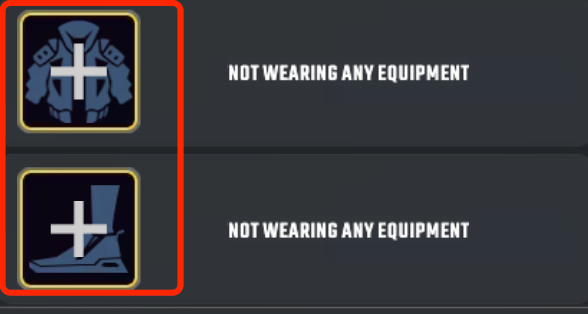
Players can click the empty slot to change equipment and also can click on the equipped slot to “Forge” or “Replace” the equipment.

<figure><img src="https://1966908961-files.gitbook.io/~/files/v0/b/gitbook-x-prod.appspot.com/o/spaces%2FHUloU5VEqGVzKkuLmfSy%2Fuploads%2Ffxn4JvqzXg3nENxnhlUx%2F29.png?alt=media&#x26;token=1aaa30fd-96a7-43a8-8ff8-e04f81820e21" alt=""><figcaption><p>Empty slot to change equipment</p></figcaption></figure>

The attributes of the equipment are divided into base attributes and random attributes. When the element of the equipment fits with the element of the hero, it can increase the base attribute of that equipment by a percentage.

<figure><img src="https://1966908961-files.gitbook.io/~/files/v0/b/gitbook-x-prod.appspot.com/o/spaces%2FHUloU5VEqGVzKkuLmfSy%2Fuploads%2FhbED8LsGEVipf3H6CkXh%2F30.png?alt=media&#x26;token=614f65cb-01e5-4e9b-bb92-3fa6149d3300" alt=""><figcaption><p>Equipment details</p></figcaption></figure>

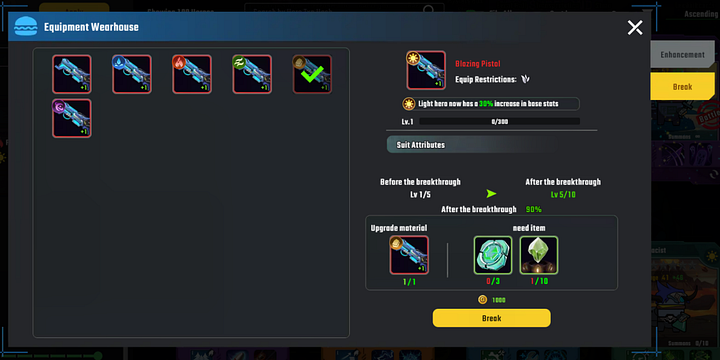
After clicking the “Forge”, there are two tabs (Enhancement and Break) on the right side. Players need to consume the required materials and gold to enhance the equipment level. Meanwhile, it will increase the base attributes if players enhance the equipment successfully. Players can break through to unlock the level limit of the equipment by consuming materials and needed items.

<figure><img src="https://1966908961-files.gitbook.io/~/files/v0/b/gitbook-x-prod.appspot.com/o/spaces%2FHUloU5VEqGVzKkuLmfSy%2Fuploads%2Fr2j14vaqNDalXS0UF8rz%2F31.jpeg?alt=media&#x26;token=deff23b4-4cea-4d43-b3d7-b24ac42bdd16" alt=""><figcaption></figcaption></figure>

<figure><img src="https://1966908961-files.gitbook.io/~/files/v0/b/gitbook-x-prod.appspot.com/o/spaces%2FHUloU5VEqGVzKkuLmfSy%2Fuploads%2Fti1hN8SVkcynVFQs2Hdz%2F32.png?alt=media&#x26;token=2c57c02b-b720-4479-890d-c3c61daf7faf" alt=""><figcaption></figcaption></figure>

**Attention**: Players can gain the materials needed instead of dropping the complete equipment directly during the battle.

\
\
\ <br>


---

# Agent Instructions: Querying This Documentation

If you need additional information that is not directly available in this page, you can query the documentation dynamically by asking a question.

Perform an HTTP GET request on the current page URL with the `ask` query parameter:

```
GET https://burgerswap.gitbook.io/burgercities/gameplay/battle-function/equipment-function.md?ask=<question>
```

The question should be specific, self-contained, and written in natural language.
The response will contain a direct answer to the question and relevant excerpts and sources from the documentation.

Use this mechanism when the answer is not explicitly present in the current page, you need clarification or additional context, or you want to retrieve related documentation sections.